
Thursday, November 28, 2013


GNUplot Tutorial for beginners (on Linux)
GNUplot
is a versatile graphing and plotting tool which is more than
sufficient for all your graphing needs. Some of the impressive
features that I appreciate are:
- It provides great flexibility when you want a script to automate your graphing. I had to run several hundred simulations and plot the data for each and every one of them. Without GNUplot, i could not have done it.
- It can produce graphs in many different formats (both in vector and raster formats)
- It has nice curve-fitting tools
- It is free!
So, lets get started.
Sunday, November 24, 2013

Thursday, November 21, 2013
A Hike to Gunung Panti
I
was introduced to Couchsurfing.org quite sometime back by one of my
friends. It sounded interesting, but I was not too keen to try it out
then. However, recently I have been really interested in going out
and exploring the possibilities. I decided to join in a group of
people to hike Gunung Panti mountain in Johor Bahru, Malaysia. The
hike was organised by Philip from couchsurfing. Philip is a Filipino
and is a regular hiker and had hiked Gunung panti 8 times before. The
group seemed large, with 25 people in it. I made a choice based on my
gut instinct and joined them on the hike last Sunday.
 |
| At Woodlands MRT |
I
prepared myself for the hike, packed a sling bag with essential items from a
list made by Philip. Everything was being communicated to everyone in the group
through a Whatsapp group created out of convenience. The estimated expense was
30-40 MYR or Ringgits. As I was staying up for long hours for quite a few days,
i was finding it difficult to sleep early so that I can get up at 5 AM on the
day of hike and get ready. Eventually, I went to bed at 2 AM and the excitement
did not let me sleep properly.
 |
| Things that I packed |
Wednesday, November 20, 2013
Managing Multiple Terminal Windows in Ubuntu 12.04/Linux
If you are working on a big project
with large directories containing several source files, then there is
a good chance that you might need multiple files to be open at the
same time. And if you use vim editor or rely more on terminal (CLI)
in a linux environment to accomplish your work, then you definitely
would have felt the need to manage the multiple terminal windows that
lay scattered around all over the desktop. I tried other options like
terminator etc., but my friend recently introduced me to Byobu, and I
find it to be the best and straightforward option to manage multiple
terminal windows.
To install Byobu:
// Install byobu
% sudo apt-get install byobu
To use it:
Open a terminal window (Cntl+Alt+t)
// just type byobu
% byobu
And, now use the following key-bindings
to create new terminal window panes and navigate between them.
       F2 - Create a new window

       F3 - Move to previous window

       F4 - Move to next window

       F5 - Reload profile

       F6 - Detach from this session
For more key-bindings and info, go to: http://byobu.co/documentation.html
Here's a screen-shot of how i looks:

I hope this helps. :)
Tuesday, October 29, 2013
The amazing spectacle of Angkor Wat
Hi everyone, so I am
back on the blog after quite a long time. This time, I will share my first ever
experience as a tourist in a foreign land (Cambodia). It’s been over a year for
me in Singapore, but I came here as a student. All this while, I had some very
nice experiences, but could never find time to write about them. But this one
is special and I must document it. This should also help other prospective
travelers to Angkor Wat, Cambodia.
 |
| Angkor Wat |
So, I planned this trip
at very short notice. I had no group at first, but wanted some company as I
lack experience as a lone ranger. I managed to get 3 of my friends on board at
first, but 2 of them could not manage to stick around. Finally, I and Sumedh
(my senior at NTU) went on with the trip. We flew Tiger Airways from Singapore
on 27th October (Sunday) and reached Phnom Penh at 12:30 PM local time. The
flight was short and easy. Since the trip was only 2 days long (we had to
return on Tuesday morning), our main purpose was to visit the great Angkor Wat
temple. To be honest, I had no clue about anything else in Cambodia. This is
not a good practice and I recommend that you know quite a bit about a place
before you pack your bags.
Saturday, January 12, 2013
Solution: Windows Live (Hotmail) not working properly in Ubuntu 12.04
As NTU mail is hosted on Window Live (Hotmail), I was having this problem when I tried opening my mails in Ubuntu. This seems to be some compatibility problem where Windows Live refuses to recognize operating systems other than Microsoft Windows. However, the good news is that there is a way around this. Install the Firefox add-on called 'User Agent Switcher'. This will allow Firefox to mimic as if it is running on Windows and hence solves the problem.
The same works for Google Chrome as well. Install the extension called 'User-agent switcher'. Once installed, it will sit right next to the address bar. Click on it and choose 'Chrome on Windows' and it should work just fine.

Tuesday, January 8, 2013
Installing Dropbox on Ubuntu 12.04 in 4 easy steps
To my surprise, using Ubuntu Software Center to install Dropbox didn't workout. So, I was looking out for alternatives. I tried many options from Ubuntu forums which included command line options, but none worked. Finally, I reverted back to Synaptic Package Manager (SPM) and it was the easiest and also worked like a breeze. Here are the steps:
(Note: If you don't have SPM, you can esily install it from Ubuntu Software Center.)
1. Open SPM and type 'dropbox' in the search box and mark the first option for installation.


(Note: If you don't have SPM, you can esily install it from Ubuntu Software Center.)
1. Open SPM and type 'dropbox' in the search box and mark the first option for installation.

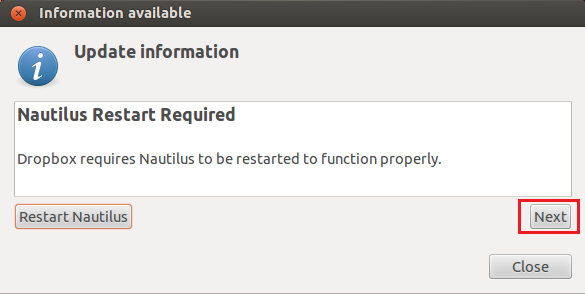
2. When prompted with the screen shown below, click Next
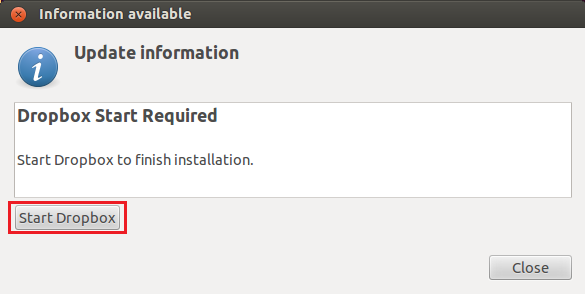
3. Then click ‘Start Dropbox’
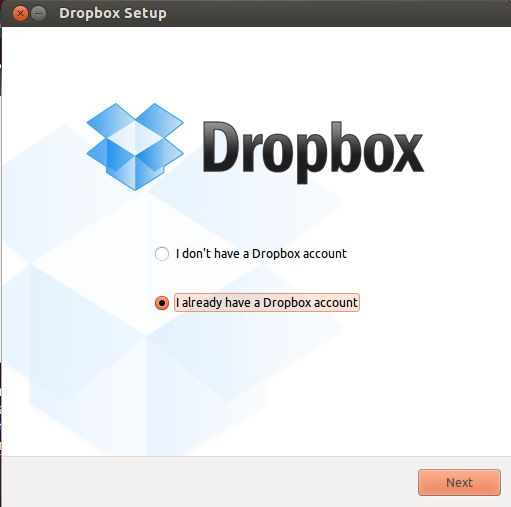
4. Choose your option as shown below and begin downloading and installing Dropbox.
And thats it! Have fun.
Monday, December 10, 2012
How to share files between Windows and Linux running on VMware
This is what you need to do share files between your Windows and Linux running on VMware without switching back and forth every time you need to access one of your files in the Windows desktop while working in a virtual machine.
1. Go to VMware>> Virtual Machine>> Virtual Machine Settings...>> Options

2. Select "Shared Folders" and enable it. (its disabled by default)

3. Click on the "Add..." button and browse for the folder or drive you want to access from the Windows file-system.
4. Click on "OK"
And you are good to go.
While inside the virtual machine, you can access your shared files under the File System>> mnt>> hgfs
Caution: Do not access the same file in both Windows and the virtual machine at the same time as it could result in unpredictable behavior. It is not recommended to share without backing up.
Have fun!
1. Go to VMware>> Virtual Machine>> Virtual Machine Settings...>> Options


3. Click on the "Add..." button and browse for the folder or drive you want to access from the Windows file-system.
4. Click on "OK"
And you are good to go.
While inside the virtual machine, you can access your shared files under the File System>> mnt>> hgfs
Caution: Do not access the same file in both Windows and the virtual machine at the same time as it could result in unpredictable behavior. It is not recommended to share without backing up.
Have fun!
Sunday, September 16, 2012
Excellent resource to refresh your c++
I was trying to find a a resource to get a quick refresh of my old and rusted c++ skills and my senior told me about www.cplusplus.com . Its a very nice website with eloquent explanation of all basic concepts in a very coherent manner. Its also very useful for newbies who are trying to self-learn c++. You would have to register with the site to make use of its features. The tutorials are under the "Documentation" section.
 |
| Screen shot of homepage of cplusplus.com |
Saturday, September 15, 2012
Rookie's Journey Through Linux
Its almost after 5 years that I am coming back to Linux, so I find myself only as good a rookie. 5 years ago it was for my c/c++ undergrad courses that I had to use linux. And a few months back, I had a short stint with the RedHat Linux for Cadence Virtuoso. But as I said, it was only a short stint. :)
I thought I would document my step by step evolution and experiments with Linux and other softwares that I may use with it. To be frank, I am no expert and I would request readers to point out any mistakes or misconceptions that may creep in!
I got Ubuntu 12.04 (Precise Pangolin) distro on VMware Player 4.0.4. I would suggest using VMware Player only if you have sufficient RAM on your PC. I assigned 4GB RAM for the virtual machine but I guess 2 GB is also good enough. Anything less than that may be give you less than desired performance.
I thought I would document my step by step evolution and experiments with Linux and other softwares that I may use with it. To be frank, I am no expert and I would request readers to point out any mistakes or misconceptions that may creep in!
I got Ubuntu 12.04 (Precise Pangolin) distro on VMware Player 4.0.4. I would suggest using VMware Player only if you have sufficient RAM on your PC. I assigned 4GB RAM for the virtual machine but I guess 2 GB is also good enough. Anything less than that may be give you less than desired performance.
 |
| Ubuntu 12.04 on VMware Player 4.04 |
Thursday, September 13, 2012

Monday, August 6, 2012
iPad or Kindle: which one is for you?
With all PC and mobile phone manufacturers taking the leap of faith and releasing tablets every now and then, consumers are loaded with a plethora of choices. There is no denying that there is still no one out there to beat the iPad as a complete tablet that it is. But with this amazing eReader called Kindle from Amazon.com, I would say you should have a relook at your priorities.

The general question that arises is what do you need? Do you want a complete power packed tablet that does almost everything, runs a whole gamut of apps, takes photos, allow video chat , surf the web and what not and plus its an eReader, then probably you should go for an iPad. But if all you really care for is a decent eBook reading and some web surfing on the go, then you are looking at this nice little device called Kindle which is essentially an eReader at best.
I must make it clear that there is no question on the performance of these two devices, its only about the purpose that they serve. Both are really good at what they promise to do. But your decision should be a well-informed one and only based upon your needs and not upon the fantasy.
So, here I am going to explore some general criteria that would you make a wise choice by looking at the different aspects of the two devices and see what suits you the best. This would not only help you get the right device, but might also save a considerable amount of money!
The most important factor: Price
The Kindle Fire is Amazon's Android-based Kindle tablet. At $199, it's far less expensive than the iPad, which ranges from $399 for the iPad 2, to $499-$829 for the new iPad 3 (the third generation device). You can also get Kindle devices for as little as $79.
But the key is going to be what you do with the device. The machines are substantially different and serve different purposes. That said, if you're very much budget constrained, the Kindle Fire is a nice little machine for $199.
The Size do matter
The Kindle Fire is a 7-inch device, while the iPad is nearly 10-inches in size. The iPad is also considerably heavier. Again, it depends on what you want to do with the device.

I have my Kindle Fire on my night table, and it's my bedroom reader (and, sometimes, I cheat and look something up on the Web with it). The iPad would be uncomfortably large to read in bed. On the other hand, the iPad is great for larger documents and reading PDFs, so if you want to see something in detail, you'll want the iPad. With the new Retina display, the iPad is clearly the better looking of the two devices.
Ecosystem
Each device is tightly tied into an ecosystem of products and services. The iPad is tightly integrated into Apple's App store, and the iTunes ecosystem. The Kindle Fire is tightly tied into the Amazon ecosystem.
I'll be honest: I prefer the Amazon ecosystem far more than Apple's, but that's me. Both my friends and I have Amazon Prime accounts, we buy most of our goods from Amazon, we read Kindle books almost exclusively, and we watch the large library of free Amazon Prime videos.
If you're a heavy Amazon user, the Kindle Fire is something of a no-brainer. Of course, you can also read all your Kindle books on the iPad or even your iPhone. Smart boys, those Amazon chaps.
By contrast, I've never liked iTunes and I find the Apple App store cumbersome. But there's no getting over the fact that Apple does have a tremendous presence in the App store game...
Let the Apps talk!
Let's be clear. Nothing... and I mean nothing touches the assortment of apps available for iPads and iPhones. It's almost insane. Apple claims over 500,000 iPhone and iPad apps. By contrast, the Amazon AppStore has 31,000 apps -- a large selection, but tiny compared to Apple.
If you want apps, the clear winner is Apple. In addition, the apps available for the iPad are often far more capable and powerful than those you'll find for the Kindle Fire.If apps are your game, the winner is, without a doubt, the iPad.
Mobile connectivity
The Kindle Fire is a WiFi-only device. That means you need to be connected to a router to browse the Web and download books and apps. Many iPads are also WiFi-only devices, but the new 3rd generation iPad also can be purchased with 4G high-speed wireless connectivity (and the cheaper iPad 2 with 3G).
Interestingly, although the Fire doesn't have any 3G wireless capability, all the older Kindles do -- but only for downloading books you bought from Amazon.
If you want to browse the Web while at your local coffee shop or in the airport, the winner is clearly the iPad.
Flash support for websites
This one is simple. The Kindle Fire supports Flash (meaning a lot of Web sites that don't work on the iPad work on the Kindle Fire). If you want to browse a Flash Web site (and this includes a ton of educational sites), the winner is clearly the Kindle Fire.
Native USB drive mode
There’s much better access to the Kindle Fire as a storage device than Apple provides with the iPad. For example, you can take a USB cable, plug it into the Kindle Fire and then to your PC, and drag-and-drop documents for later reading.
There are some hacks for this for the iPad, but native USB drive mode is supported, out of the box, for the KindleFire. There is a detail here, though. While the Kindle Fire supports this without fiddling, the device doesn't actually come with a cable that will connect to your computer. Of course, you know where to go if you want to order one, don't you? Click here to order one from Amazon.com.
Usage model
We touched on this earlier, but let's make it explicit. The Kindle Fire excels at consuming Amazon content. If you want to consume Amazon content, whether it's Kindle books or Amazon Prime videos, the Kindle Fire is the clear winner.
On the other hand, if you want to consume or create other content, the choice isn't as clear. You can watch Netflix videos on both, for example. But if you want to see high-quality 1080p video on a vivid display, you'll want to get the iPad 3.
Both devices will let you read PDF files quite nicely. I’ve found that the 7-inch form-factor of the Kindle Fire makes it much easier to hold the Kindle Fire in one hand, and fiddle with a switch, knob, menu-panel, or button in the other. It's much harder to do that with the iPad.
So, as you can see, it's up to how you use the device to determine which is a better fit in terms of usage.
Support
Support is always relative, and depends on which company ticked you off last. That said, both Apple and Amazon provide surprisingly good support, at least compared to the norm in tech products. For support, it's a tie. The only major downside is that, unless you've ponied up for AppleCare, you're on your own for support after the free support period ends. As far as I know, Amazon support is ongoing.
Saturday, July 28, 2012
Free Card Design with OCBC FRANK Account
This is especially for those students who are on stipends or who are earning part-timers. Wonder if you were also tempted by those card designs that adore the walls of OCBC FRANK branch at NTU, but settled for the free complimentary design due to budget restrictions. If that is the case, then there is good news.
If you decide to credit your monthly pay into your new OCBC FRANK account, then you can choose a card design for your free ATM/debit card absolutely free of cost. This offer is valid only if you open a FRANK savings account before 31, October 2012. You can choose any card design (which they usually may charge upto S$ 20) except the ones in Designer Series.
You can check out the card designs here. You can know more on this from here.
One thing to note is that sometimes the people at the branch may not be aware of this promotion. This happened to me. I had seen this promotion on the website but when I asked at the counter, they said that the promotion ended in August itself. But I called the customer service and they responded aptly and now I am going to get my favorite card design. Now thats being FRANK! :)
So get ready to get your funky new ATM card and flaunt it among your friends. :)

You might be also interested in: FRANK by OCBC vs DBS Remix : Which one to choose!
If you decide to credit your monthly pay into your new OCBC FRANK account, then you can choose a card design for your free ATM/debit card absolutely free of cost. This offer is valid only if you open a FRANK savings account before 31, October 2012. You can choose any card design (which they usually may charge upto S$ 20) except the ones in Designer Series.
 |
| Screen shot of the promotion from OCBC website |
One thing to note is that sometimes the people at the branch may not be aware of this promotion. This happened to me. I had seen this promotion on the website but when I asked at the counter, they said that the promotion ended in August itself. But I called the customer service and they responded aptly and now I am going to get my favorite card design. Now thats being FRANK! :)
So get ready to get your funky new ATM card and flaunt it among your friends. :)

You might be also interested in: FRANK by OCBC vs DBS Remix : Which one to choose!
Thursday, July 26, 2012
FRANK by OCBC vs DBS Remix : Which one to choose!
Hi All,
 I thought of producing this post to help out those people out there who are really confused about which bank to go for to open a savings account. They feature attractive benefits like No initial deposit and no fall back fee (i.e. no minimum balance is needed to be maintained!). Being someone who has an account in both the schemes, I feel that I can give out some information based on my interaction with the Banks to help you out in making an informed decision.
First of all, if you ask anybody in Singapore about their preferred bank, they will suggest DBS in unison. It is definitely the most preferred bank in Singapore with maximum number of ATMs island-wide.
 However, OCBC is also pretty good and you can see an OCBC ATMs in almost all public places like malls, MRTs and in University campus. Considering the fact that DBS has maximum number of takers, you will often find large queues in front of DBS ATMs in public places while OCBC ATMs would be relatively less crowded. However, DBS gives you the freedom of using ATMs of both DBS as well as POSB. (DBS and POSB are one and the same)
Next, if you see the interest rates offered by these two, OCBC clearly have an edge over DBS. DBS is offering 0.05% till the first S$ 2,50,000 and then it gets slightly better as the deposit goes up. Whereas OCBC FRANK accounts are offering 0.3% for the first S$ 10,000 and the rates get even better with increase in savings. But for a student who is supposedly not going to have much savings in the bank, the variations in interest rates is not a great concern.
 Now, the next most important factor that all of us take into account is the accessibility. OCBC has a FRANK branch within the NTU University campus whereas DBS has a REMIX branch in NUS campus. Being an NTU student, I definitely would go for OCBC. DBS doesn't have a cash deposit machine on the NTU campus whereas OCBS do. However, you can find a DBS branch in the Jurong Point mall in Boon Lay, which is pretty close as well.
 Another important point to note is that DBS will charge you a fee of S$ 2 if you perform any withdrawal over the bank branch within your daily ATM withdrawal limit (example: If you try to withdraw S$ 1000 from your account over the branch while your daily withdrawal limit is S$ 2000. You should use DBS ATM for such transactions to avoid being charged. OCBC has no such restrictions.
Again, DBS has no fee whatsoever, annually or monthly. However, OCBC will charge you S$ 20 from the second year onwards as ATM fee. But this fee is waived if you spend atleast S$ 1800 using your ATM Debit card over the previous year. I think that should not be a problem as you would anyway spend more than S$ 2000 in a year anyway!
One more important thing is the longevity of these benefits. These benefits (No initial deposit and no fall back fee) are applicable to all people below 26 years if you are in OCBC, while this limit is extended to 29 years in DBS. Also, the interest rates are subject to change as it is a promotional rate and the banks reserve rights to alter them later.
Now, another fancy stuff that OCBC is providing to attract the youth, is a Designer card! You can pay a nominal fee and get an attractive design for your ATM Debit card to make different from others and add your own taste to it. They also give a trendy laptop sleeve upon a fresh account opening. But these are all sugar coating and should not bother you much.
 There is one thing on which I am not very sure and that is about the rates for remittances to a foreign nation. I understand that DBS has a collaboration with ICICI bank in India and thus is able to provide cheaper transaction rates to and from India. DBS also has a few branches in India (Chennai, Madurai, Trichy etc.) as well. But I am yet to ascertain on these details. I would request the readers to add to it if they have relevant information.
Some of my friends who are doing Master's are also worried about the tuition fee loan. I must say that both OCBC and DBS are similar in this regard. Both are ready to issue upto 90% of tuition fee as loan at an interest rate of 4.75% which is payable only after your course completion.
After going through all this, I believe now you are well informed enough to make the right choice. In fact, I was totally confused and I opened an account in both the banks. Since opening an account and maintaining it does not incur you any costs, you can go for this option as well!
You might be also interested in: Free Card Design Promotion with OCBC FRANK account
First of all, if you ask anybody in Singapore about their preferred bank, they will suggest DBS in unison. It is definitely the most preferred bank in Singapore with maximum number of ATMs island-wide.
Next, if you see the interest rates offered by these two, OCBC clearly have an edge over DBS. DBS is offering 0.05% till the first S$ 2,50,000 and then it gets slightly better as the deposit goes up. Whereas OCBC FRANK accounts are offering 0.3% for the first S$ 10,000 and the rates get even better with increase in savings. But for a student who is supposedly not going to have much savings in the bank, the variations in interest rates is not a great concern.


Again, DBS has no fee whatsoever, annually or monthly. However, OCBC will charge you S$ 20 from the second year onwards as ATM fee. But this fee is waived if you spend atleast S$ 1800 using your ATM Debit card over the previous year. I think that should not be a problem as you would anyway spend more than S$ 2000 in a year anyway!
One more important thing is the longevity of these benefits. These benefits (No initial deposit and no fall back fee) are applicable to all people below 26 years if you are in OCBC, while this limit is extended to 29 years in DBS. Also, the interest rates are subject to change as it is a promotional rate and the banks reserve rights to alter them later.
Now, another fancy stuff that OCBC is providing to attract the youth, is a Designer card! You can pay a nominal fee and get an attractive design for your ATM Debit card to make different from others and add your own taste to it. They also give a trendy laptop sleeve upon a fresh account opening. But these are all sugar coating and should not bother you much.

Some of my friends who are doing Master's are also worried about the tuition fee loan. I must say that both OCBC and DBS are similar in this regard. Both are ready to issue upto 90% of tuition fee as loan at an interest rate of 4.75% which is payable only after your course completion.
After going through all this, I believe now you are well informed enough to make the right choice. In fact, I was totally confused and I opened an account in both the banks. Since opening an account and maintaining it does not incur you any costs, you can go for this option as well!
You might be also interested in: Free Card Design Promotion with OCBC FRANK account
Wednesday, July 4, 2012
There was a time...
There was a time when everybody who smiled at you was a "friend".
When the boy who owned the cricket bat was the "boss".
When loosing a "rubber" was reason enough to cry.
When "searching" for a one rupee coin on the TV stand used to give you goosebumps.
When the prettiest girl in the class was just another friend.
When Jimmy Bhaiya's Samosa were the ultimate concept of a "grand treat".
When the Principal was more scary than a zombie.
When vacations were filled with fun, surrounded by cousins and we never thought of them as irritating.
When you used to beg to mom to skip tuition for "Alladin" on Fridays.
When shining the cycle rim was the toughest job of all.
There was a time when our eyes used to brim with playful innocence,
and the job of worrying was left to mom and dad.
I can't explain enough how I miss those times!
When the boy who owned the cricket bat was the "boss".
When loosing a "rubber" was reason enough to cry.
When "searching" for a one rupee coin on the TV stand used to give you goosebumps.
When the prettiest girl in the class was just another friend.
When Jimmy Bhaiya's Samosa were the ultimate concept of a "grand treat".
When the Principal was more scary than a zombie.
When vacations were filled with fun, surrounded by cousins and we never thought of them as irritating.
When you used to beg to mom to skip tuition for "Alladin" on Fridays.
When shining the cycle rim was the toughest job of all.
There was a time when our eyes used to brim with playful innocence,
and the job of worrying was left to mom and dad.
I can't explain enough how I miss those times!
Monday, July 2, 2012
Philips SHQ1000 Sports Headphones - Red

I have used many headphones and the best among them is unarguably the one that came bundled with my Apple iPod! But I find it difficult to use them when I am traveling or during a gym session or jogging.
The white ear buds of an iPod would get dirty very quickly and the soft rubber lining around its edges would wear out due to constant friction along with the sweat generated during these activities. Once that lining is gone, it is almost impossible to neglect the kind of discomfort that it might cause. In other headphones, I have experienced that the sweat might even spoil the functionality of the ear piece!

Finally I found Philips SHQ1000 Sports headphones that are specifically designed for this purpose. Philips SHQ1000 is has a standard gold plated 3.5 mm stereo jack and is made of water resistant material, ideal for your outdoor adventures. The headphones come with 3 pairs of interchangeable caps that are made of high quality soft antibacterial rubber and you can choose the one that makes you feels comfortable. This also protects the internals of the earpiece from damage due to humid conditions.
Wednesday, June 27, 2012


Tuesday, June 19, 2012
Raj Comics : Part 2 … Indian Comics
I was pleased to see the interest the readers have shown on my previous post titled ‘Indian Comics : an intro’
As promised earlier,here I am with a lil info on other characters from the RC universe.
PARMANU:
Vinay was traumatized when he saw his classmate being murdered by none other than the Head of Police.Accidently he found the murder weapon,a police revolver. The wicked Policeman came after his life to save his reputation in the society

His family was brutally murdered but Vinay was saved by his maternal uncle-Prof.K.K – who is a nuclear scientist,Vinay calls him Professor.
As promised earlier,here I am with a lil info on other characters from the RC universe.
PARMANU:
Vinay was traumatized when he saw his classmate being murdered by none other than the Head of Police.Accidently he found the murder weapon,a police revolver. The wicked Policeman came after his life to save his reputation in the society

His family was brutally murdered but Vinay was saved by his maternal uncle-Prof.K.K – who is a nuclear scientist,Vinay calls him Professor.
Thursday, June 14, 2012
The need to talk about Educational Loans
I am extremely grateful to Aamir and the entire team of Satyamev Jayate for spreading awareness on various topics concerning us, the common Janata of India.
As a student from a middle-class family, my immediate concerns are very disconnected from the many issues that have been raised in Satyamev Jayate till now. After four years of engineering studies, now a huge task is glaring on my face- repaying the education loan that my parents took from a National bank for my education.
In a nation where car and home loans are cheaper than an educational loan, I would request the SMJ team to take up this issue. I can assure you that you would be spell-bound by the magnitude of support that you would get for this as this a problem that directly affects the youth of India irrespective of the gender, caste or color.
We should learn from a nation like Singapore which bases its development on the grounds of sound education. I am not very proud when I mention that I have received a full scholarship and S$ 2000 monthly stipend in a Singaporean National University for my PhD studies while I am yet to repay the huge interests that have piled up back here in my own country for an educational loan. Though I understand that India can't afford that much, but at least the Govt. should ensure an interest free moratorium period to encourage the students and their parents.
This is despite the fact that the Govt. of India has directed the National banks to waive the interests during the moratorium period. But every time I have gone to my bank to inquire on this, the send me back with a bland answer: " We don't know, we have not been directed anything yet!" (It should be noted that this announcement filled the newspapers as early as in 2009). Check this PIB link: Press Information Bureau .
Lets hope for a better tomorrow, where we Indians work for our own India in an environment that is conducive for burden less education, so that we don't have to go abroad to get us a better future.
As a student from a middle-class family, my immediate concerns are very disconnected from the many issues that have been raised in Satyamev Jayate till now. After four years of engineering studies, now a huge task is glaring on my face- repaying the education loan that my parents took from a National bank for my education.
In a nation where car and home loans are cheaper than an educational loan, I would request the SMJ team to take up this issue. I can assure you that you would be spell-bound by the magnitude of support that you would get for this as this a problem that directly affects the youth of India irrespective of the gender, caste or color.
We should learn from a nation like Singapore which bases its development on the grounds of sound education. I am not very proud when I mention that I have received a full scholarship and S$ 2000 monthly stipend in a Singaporean National University for my PhD studies while I am yet to repay the huge interests that have piled up back here in my own country for an educational loan. Though I understand that India can't afford that much, but at least the Govt. should ensure an interest free moratorium period to encourage the students and their parents.
This is despite the fact that the Govt. of India has directed the National banks to waive the interests during the moratorium period. But every time I have gone to my bank to inquire on this, the send me back with a bland answer: " We don't know, we have not been directed anything yet!" (It should be noted that this announcement filled the newspapers as early as in 2009). Check this PIB link: Press Information Bureau .
Lets hope for a better tomorrow, where we Indians work for our own India in an environment that is conducive for burden less education, so that we don't have to go abroad to get us a better future.
Subscribe to:
Posts (Atom)