Showing posts with label steps. Show all posts

Tuesday, January 8, 2013

Installing Dropbox on Ubuntu 12.04 in 4 easy steps

       To my surprise, using Ubuntu Software Center to install Dropbox didn't workout. So, I was looking out for alternatives. I tried many options from Ubuntu forums which included command line options, but none worked. Finally, I reverted back to Synaptic Package Manager (SPM) and it was the easiest and also worked like a breeze. Here are the steps:
(Note: If you don't have SPM, you can esily install it from Ubuntu Software Center.)

1. Open SPM and type 'dropbox' in the search box and mark the first option for installation.


2. When prompted with the screen shown below, click Next
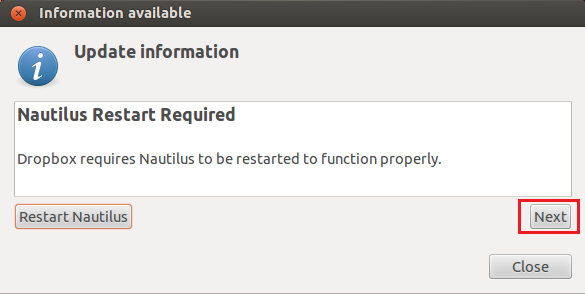
 dropbox_precise
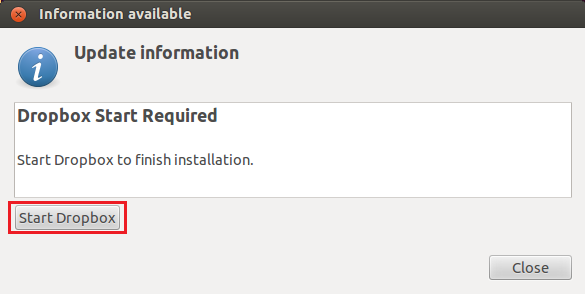
3. Then click ‘Start Dropbox’
 dropbox_precise_1
 4. Choose your option as shown below and begin downloading and installing Dropbox.
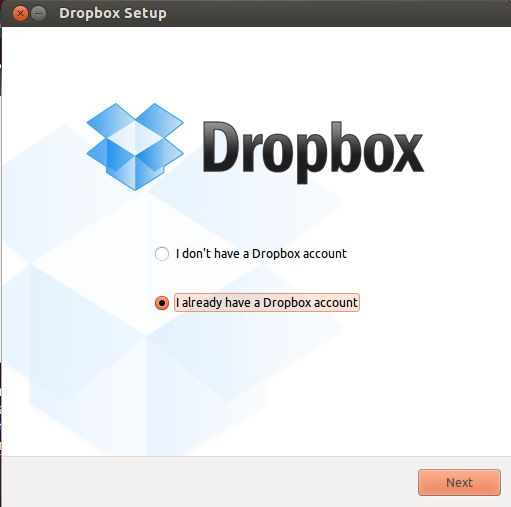
 dropbox_precise_2
And thats it! Have fun.

Saturday, September 15, 2012

Rookie's Journey Through Linux

Its almost after 5 years that I am coming back to Linux, so I find myself only as good a rookie. 5 years ago it was for my c/c++ undergrad courses that I had to use linux. And a few months back, I had a short stint with the RedHat Linux for Cadence Virtuoso. But as I said, it was only a short stint. :)

  I thought I would document my step by step evolution and experiments with Linux and other softwares that I may use with it. To be frank, I am no expert and I would request readers to point out any mistakes or misconceptions that may creep in!

 I got Ubuntu 12.04 (Precise Pangolin) distro on  VMware Player 4.0.4. I would suggest using VMware Player only if you have sufficient RAM on your PC. I assigned 4GB RAM for the virtual machine but I guess 2 GB is also good enough. Anything less than that may be give you less than desired performance.

Ubuntu 12.04 on VMware Player 4.04